
|
|
|
|||||||
| Computers & Information Technologies « Everything related to computers and internet. » |
 |
|
|
Share | Thread Tools | Search this Thread |
 04-22-2009
|
#1 |
|
Registered Member

Last Online: 03-25-2010
Join Date: May 2008
Posts: 77
Thanks: 20
Thanked 23 Times in 18 Posts
Groans: 0
Groaned at 0 Times in 0 Posts
|
 multiple screens
Hi all,
I currently have 2 screens connected to my desktop. The graphic card in the back of the case has only 2 outputs. What is the easiest (& least expensive) way to be able to connect 4 screens? Do I have to get another card that supports 4 outputs (replacing the old one), or add another card supporting 2 (so in total I have 4)? Or even better maybe, is there some kind of "fiche harame" that will dispense me of getting to put a new card (just taking more outputs from it)? NB: The screens that I have also have on their sides some kind of vga output i guess. it didn't work however connecting one to the other directly without passing through the computer itself  Thx! |

|

|
| The Following User Says Thank You to polo For This Useful Post: | SysTaMatIcS (04-22-2009) |
|
04-22-2009
|
#2 |
|
Registered Member

Last Online: 10-14-2022
Join Date: Dec 2006
Posts: 10,467
Thanks: 14,136
Thanked 4,244 Times in 2,547 Posts
Groans: 186
Groaned at 198 Times in 120 Posts
|
well what i know is that you cant get another graphics card and connect it with the other one unless if you have an sli motherboard , if you have a geforce, or a cross fite motherboard if you have an ati
__________________
problems of performance appraisal is that it sucks to memorize them |
|
|
|
|
04-23-2009
|
#3 |
|
Ma ghayro

Last Online: 04-19-2018
Join Date: Dec 2005
Posts: 5,592
Thanks: 1,765
Thanked 4,201 Times in 2,361 Posts
Groans: 12
Groaned at 18 Times in 11 Posts
|
I have dual monitors here, what you need to do is to connect the first monitor to the normal port and you need to buy a converter for the digital port (i m not sure of its name, it's the one just near the main port, max 10$) and connect the second monitor to it.
I have 2 x 19" wide aka "Autostrad"
__________________
http://twitter.com/danymoussa
|
|
|
|
|
04-23-2009
|
#4 | |
|

Last Online: 05-30-2013
Join Date: Jan 2008
Posts: 1,788
Thanks: 10,018
Thanked 1,100 Times in 651 Posts
Groans: 1
Groaned at 6 Times in 6 Posts
|
Quote:
@polo, you have to see first if your VGA's capability is able to handle 4 monitors at a time. Check this in the manufacturer official website. |
|
|
|
|
|
04-23-2009
|
#5 |
|
Super Moderator

Last Online: 02-16-2022
Join Date: May 2006
Posts: 5,580
Thanks: 1,888
Thanked 2,653 Times in 1,593 Posts
Groans: 55
Groaned at 35 Times in 32 Posts
|
nvidia quadro ?
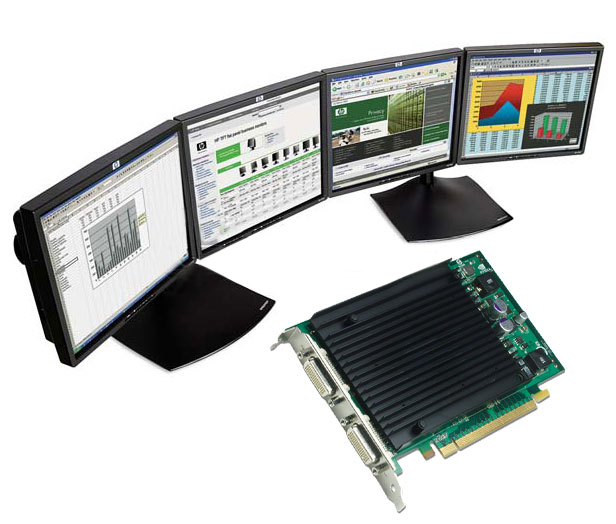
__________________
click on 'Groan' to switch to my left testicle. |
|
|
|
| The Following User Says Thank You to Kingroudy For This Useful Post: | SysTaMatIcS (04-23-2009) |
|
04-23-2009
|
#6 | |
|
Registered Member
Last Online: 03-25-2010
Join Date: May 2008
Posts: 77
Thanks: 20
Thanked 23 Times in 18 Posts
Groans: 0
Groaned at 0 Times in 0 Posts
|
Quote:
|
|
|
|
|
|
04-24-2009
|
#7 |
|
Ma ghayro
Last Online: 04-19-2018
Join Date: Dec 2005
Posts: 5,592
Thanks: 1,765
Thanked 4,201 Times in 2,361 Posts
Groans: 12
Groaned at 18 Times in 11 Posts
|
Oops it seems i didn't see the "4" monitors in your first post.
Well such thing really requires something big.
__________________
http://twitter.com/danymoussa
|
|
|
|
|
|
| Tags |
| multiple, screens |
| Currently Active Users Viewing This Thread: 1 (0 members and 1 guests) | |
|
|


